Architecture & Realtime
How a Synaplan installation fits together: the services Docker Compose starts, how messages are routed to AI capabilities, and how the realtime layer (Redis + Centrifugo) keeps everything in sync — on one machine or across a whole cluster.
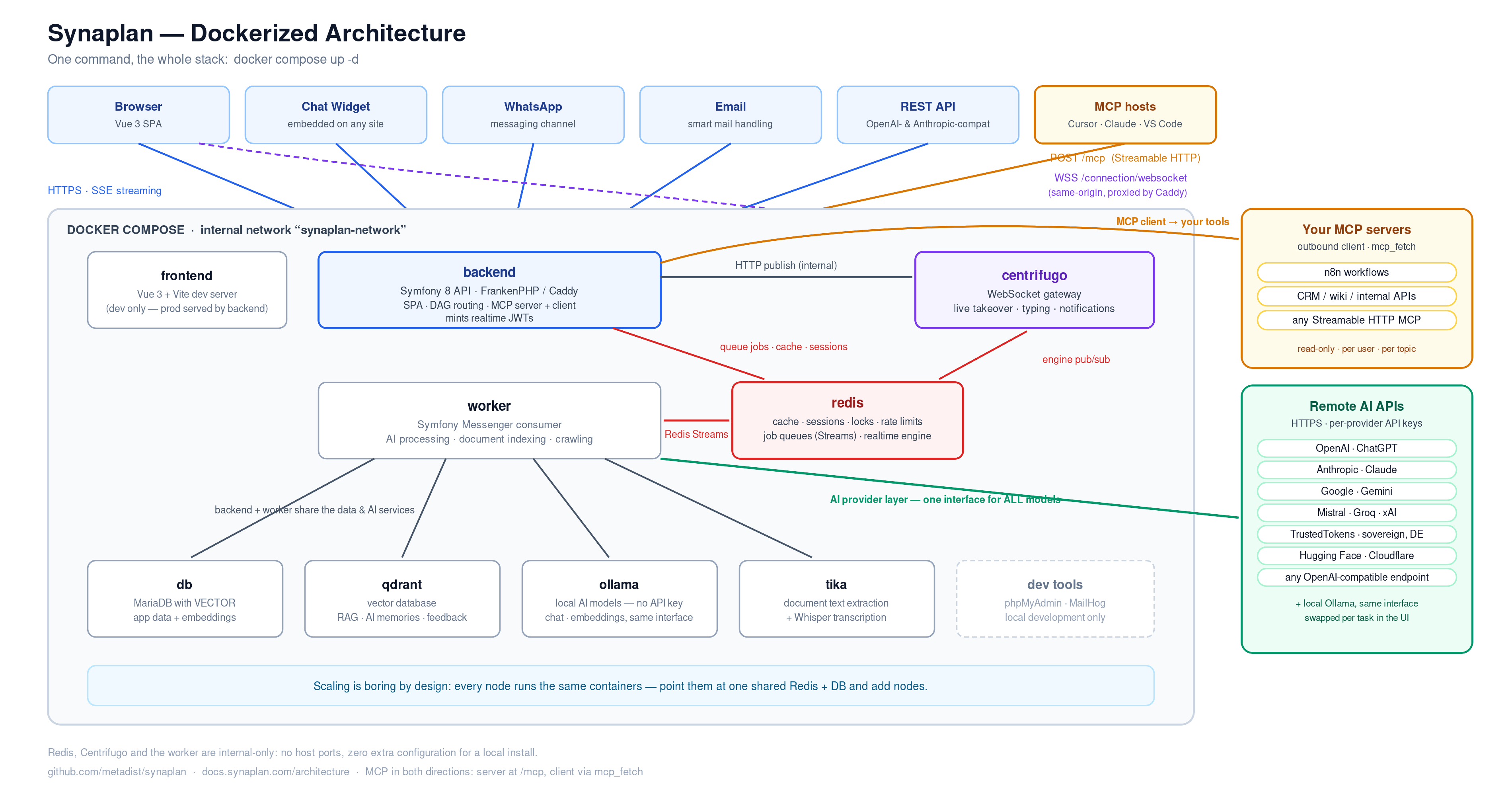
Service Map
docker compose up -d starts more than just the app. The full standard stack:
| Service | Container | Role |
|---|---|---|
| backend | synaplan-backend |
Symfony 8 PHP API + serves the built frontend (FrankenPHP/Caddy) |
| frontend | synaplan-frontend |
Vue 3 SPA (Vite dev server in development) |
| worker | synaplan-worker |
Background job consumer (Symfony Messenger) — AI processing, document indexing, widget crawling |
| db | synaplan-db |
MariaDB with VECTOR support |
| redis | synaplan-redis |
Shared infrastructure: cache, sessions, locks, rate limits, job queues, realtime engine |
| centrifugo | synaplan-centrifugo |
WebSocket gateway for realtime features |
| qdrant | synaplan-qdrant |
Vector database for AI memories, RAG, and feedback |
| ollama | synaplan-ollama |
Local AI models (standard install only) |
| tika | synaplan-tika |
Document text extraction |
| collabora | synaplan-collabora |
Optional office engine (profile office) — convert-to PDF/PNG, later WOPI editor |
| docling | synaplan-docling |
Optional document extractor (profile docling) — tables and headings; see AI infrastructure |
| searxng | synaplan-searxng |
Optional self-hosted web search (profile searxng) |
| phpMyAdmin, MailHog | dev tools | Database UI, email testing |
Redis, Centrifugo, and the worker are internal-only — they expose no host ports and need no configuration for a local install.
Compute sidecar (optional module compute)
The repository also ships sidecars/synaplan-compute — a Go service that runs
short Python or Node file work in an isolated container. PHP never mounts
docker.sock; it talks to the sidecar over an authenticated HTTP API
(COMPUTE_URL + COMPUTE_TOKEN, Compose profile compute). The feature is
switched on with COMPUTE.ENABLED and appears as a File work card in chat and
code_execution on the API gateways. In production the sidecar runs on a
separate compute node (gVisor), never on the web nodes. It is not a Synaplan
Desktop install. See Secure compute.
Message Routing (Multi-Task)
Every inbound message — web chat, widget, WhatsApp, email, or API — passes through a routing pipeline before any AI model runs:
- Pre-processing — attachments are extracted (Tika, OCR, Whisper transcription).
- Classification — rule-based routing (your per-topic task prompts) runs first; otherwise an AI sorter detects topic, language, and whether web search would help.
- Planning — for complex requests, an AI planner decomposes the message into a small task graph (for example: extract text → summarize → generate audio → compose reply).
- Execution — the task graph executes node by node (optionally in parallel for media tasks), streaming live task cards into the chat UI so users watch each step complete.
- Delivery — results, including multiple generated files from a single request, are delivered on the channel the message came from: chat, widget, WhatsApp, email, or webhook.
Simple requests skip the planner and go straight to a single handler — the classic fast path. Administrators control the feature via Settings → Routing in the app.
→ Deep dive: Multi-Task (DAG) Routing — the DAG model, the full capability set, a worked calendar-invite example, the live SSE events, and the roadmap for open DAG endpoints (n8n and other open-source services).
Streaming: SSE and WebSockets
Synaplan uses two push channels, each where it works best:
| Channel | Transport | Used for |
|---|---|---|
/api/v1/messages/stream |
SSE (Server-Sent Events) | AI answer tokens, task-plan progress events (plan, task_update, task_chunk, task_file) |
/connection/websocket |
WebSocket (Centrifugo) | Live support: human takeover, typing indicators, operator notifications |
SSE integration is described in Code Examples. The WebSocket layer is described below.
Centrifugo: the Realtime Gateway
Centrifugo is a dedicated WebSocket server that sits next to the Synaplan backend. The PHP backend never holds WebSocket connections itself — it publishes events to Centrifugo over an internal HTTP API, and Centrifugo fans them out to all subscribed browsers.
Browser ── WSS /connection/websocket ──► Caddy ──► Centrifugo
                                                      ▲
Backend (PHP) ── HTTP publish (internal) ─────────────┘
                                                      │
                                  Redis engine ◄──────┘  (shared across nodes)
Key design points:
- Same-origin connection — browsers connect to
/connection/websocketon your normal Synaplan domain. The built-in Caddy server proxies it to Centrifugo internally, so there is no CORS setup, no extra subdomain, and no additional TLS certificate. - JWT authentication — the backend mints short-lived HS256 tokens (connection + per-channel subscription tokens). Centrifugo verifies them with a shared secret (
REALTIME_TOKEN_SECRET). Every subscription is authorized server-side before the token is issued. - Channels — events are grouped into namespaces:
widget:session.*(one chat session),widget:operators.*(operator notifications for a widget),widgettyping:*(ephemeral typing previews),user:{id}(per-user), andsystem:*(public broadcasts). - Locked-down surface — only the client WebSocket endpoint is exposed publicly. Centrifugo's admin UI, HTTP API, and metrics stay on the internal network.
What this powers today: live human takeover of widget conversations (an operator takes over from the AI mid-chat), bidirectional typing indicators, and instant operator notifications for new widget messages.
Relevant settings (backend/.env): REALTIME_ENABLED, REALTIME_API_URL, REALTIME_API_KEY, REALTIME_TOKEN_SECRET, REALTIME_PUBLIC_WS_URL, REALTIME_ALLOWED_ORIGINS. In production the changeme_* defaults must be replaced — the backend refuses to mint tokens otherwise.
Redis: the Cluster Backbone
Redis is mandatory infrastructure in Synaplan — not an optional cache. One Redis instance (or one managed/HA Redis in production) carries six concerns:
| Concern | Why Redis |
|---|---|
| Application cache | Provider status, model config, idempotency keys — consistent across every backend node |
| Sessions | Users stay logged in no matter which node serves the request — no sticky sessions needed |
| Locks | Cluster-wide mutexes (cron jobs, WhatsApp dedupe) — a file lock would only protect one node |
| Rate limiting | Per-user quotas enforced globally, not per node |
| Job queues | Symfony Messenger on Redis Streams — blocking consumers, at-least-once delivery |
| Centrifugo engine | Cross-node WebSocket pub/sub (kept on its own logical DB so keys never collide) |
Why this makes a cluster "just work"
In a multi-node deployment (e.g. three backend nodes behind a load balancer), every node runs the same containers — backend, worker, Centrifugo — and they all point at the same Redis:
                      ┌─ Node 1: backend + worker + Centrifugo ─┐
Load balancer ────────┼─ Node 2: backend + worker + Centrifugo ─┼──► shared Redis
                      └─ Node 3: backend + worker + Centrifugo ─┘        │
                                                                 (cache, sessions,
                                                                  locks, queues,
                                                                  realtime engine)
- A WebSocket event published on node A reaches a browser connected to node C, because all Centrifugo instances share state through the Redis engine. The load balancer can route any user to any node — no sticky sessions, no lost events.
- A background job queued by node B is picked up by whichever worker is free, because the queue lives in Redis Streams, not in any node's memory.
- Caches never desync between nodes, scheduled jobs never run twice (locks), and rate limits hold globally.
Scaling out is therefore boring by design: add a node, point it at the same Redis and database, done.
Background Worker
Long-running work never blocks an HTTP request. The dedicated worker container consumes three Redis Streams queues via Symfony Messenger:
| Queue | Workload |
|---|---|
async_ai_high |
Chat message processing, AI memory extraction |
async_extract |
Document text extraction |
async_index |
Re-vectorization, widget URL crawling, plugin provisioning |
The worker recycles itself hourly (standard Symfony pattern to bound memory) and restarts automatically. In a cluster you can scale workers independently of web nodes — they compete for jobs on the shared Redis queues.
Check on it locally:
docker compose logs -f worker          # should show messenger:consume activity
docker compose exec redis redis-cli ping   # expects PONG
curl -s http://localhost:8000/api/health   # reports redis availability
Production Deployment
The production reference setup runs this stack across multiple nodes with a MariaDB Galera cluster and a shared Redis — deployment configs live in synaplan-platform, Helm charts for Kubernetes in synaplan-charts. The Galera cluster is a production-only concern; for local or single-server use the bundled single MariaDB container is all you need (see Quickstart & Self-Hosting).
Checklist for clustered realtime:
- One shared Redis — point
REDIS_DSN(and the Centrifugo engine address) of every node at the same managed/HA Redis. - Identical secrets on all nodes —
REALTIME_TOKEN_SECRETandREALTIME_API_KEYmust match everywhere; tokens minted on one node are verified on another. - WebSocket-friendly load balancer — forward the
Upgradeheader and keep idle timeouts above 60s (Centrifugo pings every 25s). - Restrict origins — set
REALTIME_ALLOWED_ORIGINSto your real domain(s); never ship*to production.
Related
- Developer FAQ — installation, configuration, troubleshooting
- Code Examples — SSE streaming, WebSocket events, API usage
- Widget Integration — embed live-support chat on any site
- GitHub: synaplan —
docs/REALTIME.mdin the repo covers the developer playbook for building on the realtime layer